Chumba Wamba: A Display Typeface for Bold Web Design
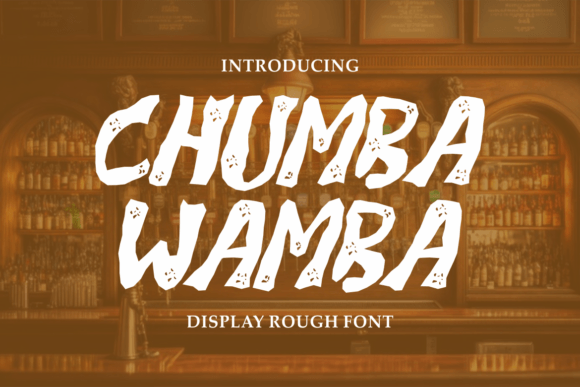
As a web designer, I’ve spent countless hours selecting the right font to elevate a digital experience. Chumba Wamba stands out as a display typeface that brings character and personality to any layout. With its intentionally messy and rough outlines, this font is more than just a visual choice—it’s a storytelling tool.
The Personality of Chumba Wamba
Chumba Wamba is designed to feel unpolished yet intentional. Its textured details and irregular outlines give it a handcrafted vibe that feels authentic. This font isn’t about perfection; it’s about presence. Each letterform carries a sense of energy and spontaneity, making it ideal for creative projects that want to stand out from the crowd.
Whether you’re designing a landing page, a banner, or a brand-focused website, Chumba Wamba adds a unique voice. It’s not meant to be used everywhere—its boldness demands attention—but when used strategically, it can become the defining element of your design.
Where to Use Chumba Wamba in Web Design
Chumba Wamba shines in areas where impact matters most. Here are some practical applications:
- Hero Sections: Use it for headlines or taglines to create immediate visual interest.
- Call-to-Action Buttons: The font’s strong outlines make it perfect for buttons that need to stand out.
- Logo Text: If your brand has an edgy or artistic identity, Chumba Wamba can help reinforce that tone.
- Online Store Banners: It adds a playful touch to product displays without overwhelming the user.
- Blog Headers: It works well for titles that want to draw readers in with a sense of creativity.
- Course Sales Pages: The font’s personality aligns with educational or creative content that values authenticity.
- Portfolio Sites: It can help differentiate your work from competitors by adding a distinctive visual identity.
However, it’s important to balance its boldness with readability. While Chumba Wamba is great for short phrases and headers, it’s not ideal for long body copy. Always pair it with a clean, readable sans serif font for supporting text.
Readability and Layout Considerations
When using Chumba Wamba on a website, consider how it interacts with different screen sizes and backgrounds:
- Mobile Screens: Ensure the font size is large enough to maintain legibility. Avoid using it on small buttons or links.
- Dark Backgrounds: The font’s texture works well against dark tones, creating high contrast and visual depth.
- Light Backgrounds: It still performs well but may require slightly larger sizing to maintain clarity.
- Image Overlays: Use it effectively on banners or overlays where it can stand out without competing with other elements.
For optimal performance, test Chumba Wamba across various devices and layouts. Its visual weight can affect scanning behavior, so use it sparingly to guide users through your content without overwhelming them.
Font Pairing Strategies
Chumba Wamba is best used in combination with simpler fonts that complement its personality. Here are a few pairing ideas:
- Sans Serif for Body Copy: Pair it with a clean sans serif like Montserrat or Lato for a balanced look.
- Serif for Editorial Feel: For a more traditional or editorial aesthetic, consider pairing it with a serif font like Playfair Display.
- Script Font for Decorative Accents: Use it alongside a script font for decorative elements or callouts.
- Modern Typographic Mix: Combine it with a modern sans serif for a contemporary, yet expressive design.
Always ensure that the fonts you choose support the same language and have proper licensing for commercial use. Check if the font includes alternates, weights, and multilingual support if needed.
Commercial Licensing and Practical Use
When using Chumba Wamba for client projects, online stores, or digital templates, make sure you have the appropriate commercial license. This ensures that your use of the font is both legal and ethical.
Consider the following when incorporating Chumba Wamba into your workflow:
- Webfont Availability: Confirm that the font is available in web-ready formats like WOFF or OTF.
- Responsive Design: Test how the font renders on different screen sizes and adjust sizing as needed.
- Brand Identity: Use it consistently across all brand assets to build a cohesive online presence.
- Design Assets: Include it in your design kits for future projects or client presentations.
Ultimately, Chumba Wamba is a versatile display font that brings character to your digital work. When used thoughtfully, it can enhance your brand’s visual identity and create memorable user experiences.